


Some buses are currently on snow routes
Due to weather conditions, some bus routes are operating on their assigned snow routes.
What you can do:
- Check the notification banner at the top of the web site for the latest updates on the status of our services.
- Use our Find My Bus tool or check Rider Alerts for route information and alerts.
- View snow route maps further down this page to see what changes during snow service.
How to ride the bus in snow and ice
When the weather forecast calls for snow or ice, we start planning early to keep as much bus service running as possible.
We want you to be ready, too. Use this page to:
- Check snow routes and maps.
- Understand snow schedules and delays.
- Learn how to use Find My Bus and Rider Alerts during winter weather.
Snow route maps
Snow routes show the safest paths our buses will take when snow or icy road conditions affect service. On snow days, buses may not travel on hills or other hard-to-reach areas and some buses may miss stops to stay on main roads.
Find your route’s Snow Route map by entering it in the search below or clicking on a number.

Cathcart Park & Ride
In the event of snow, Cathcart Park & Ride will be closed, as the roads surrounding the facility would be unsafe for bus operation in icy conditions.
If you ride one the routes that serve this park & ride (Route 109, 166, or 901), make sure to sign up for Rider Alerts for your route or check this page for alerts if there is snow. If these routes are on a snow route it means that this park & ride is closed.

Get the latest updates about your ride
We strongly encourage all riders to sign up for alerts in case your route is impacted.
Snow routes and snow schedules
Snow routes
Snow routes show which parts of a route buses will not serve when roads are snowy or icy.
On a snow route:
- Your bus may follow a different path than usual.
- Some bus stops may be closed, especially on hills or side streets.
- Service may stay on main roads only.
Not every route will be on a snow route at the same time. Road conditions vary across Snohomish County, so one bus may use its snow route while another route nearby may stay on its regular route.
To see if your bus is on a snow route and whether any stops are closed:
- Use Find My Bus to track your bus in real-time.
- Check Rider Alerts for updates if your bus is using a different snow route than what appears on the map.
Snow schedules
During winter weather, regular schedules often change.
When it snows:
- We do not use articulated buses (the long buses with a bend in the middle).
- Swift buses will use 40-foot buses.
- Service is reduced by about 25%.
- Most trips that still run may be delayed compared to the regular schedule.
To keep service predictable, we identify and “pre-cancel” specific trips on snow days. Pre-canceling trips helps us run a more reliable snow schedule.
When snow is in the forecast:
- Dress warmly and wear sturdy, waterproof footwear in case you are waiting longer at your stop.
- Make sure to charge your phone or mobile device fully.
- Subscribe to Rider Alerts for real-time snow service updates.
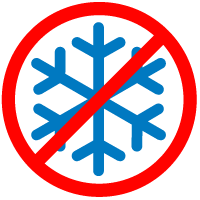


Look for the signs
If your bus stop has a snowflake symbol on the bus stop sign and snow or ice on the ground impacts service, please wait at another stop.

Snow Routes: Look for the signs
If your bus stop has a snowflake symbol on the bus stop sign and snow or ice on the ground impacts service, please wait at another stop.

Snow route signs at your bus stop
Some bus stops have a snowflake symbol on their signs. Buses will not stop at these locations when there is snow or ice, and service is on a snow route.
If your stop has a snowflake symbol and the roads are snowy or icy:
- Go to another nearby stop on a main road or flatter area.
- Check Rider Alerts to confirm if your stop is closed.
A Snow Schedule means we have spotted and “pre-canceled” specific trips to keep service as reliable as possible during winter weather.
When your bus is on a Snow Route, use Find My Bus to:
- See your bus on a real-time map.
- Check which stops buses are serving during snow and ice conditions.
Finding your bus during snow events
Find My Bus is our real-time bus information web app. It is one of the best tools to check bus departures during snow and ice.
However, during snow events, departure time predictions in the app may be less accurate because buses may:
- Be on reroutes.
- Have chains installed, so they can only travel up to 25 miles per hour (trips take longer).
- Be traveling more slowly due to icy roads and traffic.
To get the most from Find My Bus during snow:
- Use the map view on the Find My Bus page.
- Look for your route and see where your bus is on the map.
- Use the bus location to estimate when it will reach your stop.
For the latest winter weather updates, use all three tools together:
- Snow Route maps to see your route’s snow path.
- Find My Bus to see your bus in real time.
- Rider Alerts for snow schedules, delays, and cancellations.

Be Prepared
Dress for the elements
Wear sturdy shoes and dress for warmth. You may need to wait longer or walk more when weather conditions are poor.
Be seen
Make sure the bus driver can see you. Carry a flashlight and a cell phone to flag the bus. Wear something bright, light-colored, or reflective to be easily seen.
Stay alert
Speaking of Rider Alerts, sign up for them here. You can select specific routes and can choose to receive them by email or text.
Seek shelter
Get to a park & ride or another major hub for the best service options.
Stay connected
Fully charge your mobile device. Have a portable charger ready so you can use Find My Ride, receive Rider Alerts and visit our website for updates. You may also need your phone to call someone if you need assistance.
Be patient
When weather conditions are bad, Find My Ride time predictions may not be accurate. The real-time system behind Find My Ride estimates departures based on the time it typically takes to get to a bus stop. If traffic is moving slower, the countdown may appear stuck. Find My Ride will let you know if there is a bus coming. Use the map feature to see where the bus is on your route to help predict when the bus may arrive at your stop.

Be prepared
Dress for the elements
Wear sturdy shoes and dress for warmth. You may need to wait longer or walk more when weather conditions are poor.
Be seen
Make sure the bus driver can see you. Carry a flashlight and a cell phone to flag the bus. Wear something bright, light-colored, or reflective to be easily seen.
Stay connected
Fully charge your mobile device. Have a portable charger ready so you can use Find My Bus, receive Rider Alerts and visit our website for updates. You may also need your phone to call someone if you need assistance.
Be patient
When weather conditions are bad, Find My Bus time predictions may not be accurate. If traffic is moving slower, the countdown may appear stuck. Find My Bus will let you know if there is a bus coming.
Seek shelter
Get to a Park & Ride or another major hub for the best service options.
Stay alert
Sign up for Rider Alerts to find out if your bus is delayed or rerouted. You can select specific routes and can choose to receive them by email or text.